

Hawkin Connect: Integrate Your Force Data with Any Platform
Every rep lands in Hawkin Cloud, the starting point for your reports and analysis. When you need that data somewhere else, Hawkin Connect takes it there.
What is Hawkin Connect?
Hawkin Connect is one open API, the tools Hawkin builds on it, and independent partner platforms that connect through it. Hawkin is built so your data can travel:
- The data is yours. We never access or share your data without permission.
- The API is open. The Hawkin v1 API lets you, and the partners you choose, pull your own data.
- The definitions are public. A number means the same thing in every tool.
- The method has not changed. Algorithms and definitions are unchanged since 2017, so this season’s test sits alongside one from years ago.
Hawkin Connect apps
Hawkin builds and maintains these tools for our API:
- hawkinR (R package). Pull Hawkin data straight into R to cut down your data wrangling and speed up your analysis. We update the package with the API, so you don’t have to. Turn hundreds of lines of code and hours of script maintenance into a few lines of code that can update requests with the package. Check out our recent blog, Using HawkinR as a Researcher.
- hdforce (Python package). Pull tests and full force-time waveforms into Python to build your data processing directly into your visualizations and app development. Manage data frames and schemas with built-in Pandas tools that make integration fast to set up and simple to maintain. Check out our recent blog, Exploring Force-Time Waveforms in Python.
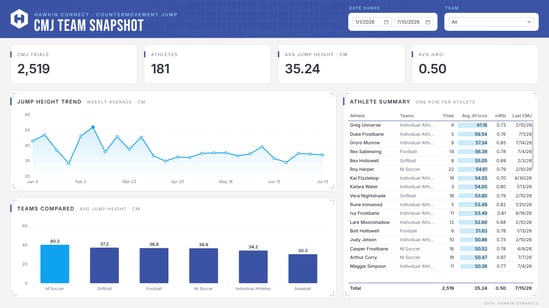
- Power Query. Bring Hawkin data into the Microsoft tools you already use, like Excel and Power BI. Download the template.
- Excel add-in. Coming soon. Load Hawkin data into any workbook using the built-in app (no code). Create custom reports or dashboards, manage rosters, keep data sets updated with manual syncs, and visualize force-time or COP data.
- Google Sheets. Coming soon. Load and sync Hawkin data into any sheet using the built-in app (no code). Create custom reports or dashboards, manage rosters, keep data sets updated with timed syncs, and visualize force-time or COP data.
- REST API. Developers and researchers build their own apps, reports and analyses. Each CMJ returns its full force-time waveform, so a custom build can go beyond summary metrics. Export the signal and check our arithmetic.
Partner integrations
Independent athlete management platforms also connect to Hawkin through the v1 API, and the partner builds and maintains each connection. Data appears in the tools your staff already open every morning. Nobody exports a file or retypes a number.
ActionApps
AiSCOUT
AthleteMonitoring / FITSTATS
CoachMePlus
Kinduct
Kitman Labs
Lumin Sports
Metrifit
Orreco
Relay Athletic
RockDaisy
TeamBuildr
Whistle Performance
Choose your tools, not an ecosystem
Hawkin does not lock your data into one software ecosystem. Use Hawkin’s apps, a third-party platform, or your own code. Use more than one at once and change later. Pick whichever tool you're most comfortable with. Some run everything through Excel, others might prefer a coding language, and some work entirely inside an AMS. The same organization can run all at once, a research team pulling raw data into R or Python for analysis while the athletic development department works entirely inside an AMS, both drawing on the same standardized data that Hawkin provides.
That makes Hawkin the most flexible choice for a force assessment program one set of tests, and you decide what happens to the data next.
What changes when data moves on its own
Manual exports are slow, and every manual step is a chance for error. A connected workflow removes manual processing.
- No re-entry. A test recorded on the plate arrives in your tools without a file in between.
- Fewer missed trials. The same query runs every time, so the dataset is complete by design.
- One source of truth. Every tool reads from Hawkin Cloud, so coaches, analysts and researchers work from the same numbers.
- Faster reporting. Dashboards refresh when new tests arrive, not when someone has time to export.
One connection, scoped to the job
The Foundation Plate, Dual Wireless Force Plates, and TruStrength data all pass through the same API, without hardware specific tokens. Your organization admin chooses the scope of each token: the whole organization, or one or more teams. Give a token for a student researcher’s project team, or separate first team and academy tokens, and organization-wide data stay protected.
That suits research across several sites and large organizations:
- Defined datasets. Each project has a clear scope, which makes ethics applications and data management plans easier to write.
- The right access for each person. Students see their project. Practitioners see their squad. Nobody passes around an organization login.
- Controlled access. One token per integration and no shared logins. Revoke a token when a project ends, and check who holds one each quarter.
- Comparable data. Every site collects using the same standardized system, with the same published definitions.
Scoped access supports data minimization, a core principle of data protection, and a common condition of ethics approval. Compliance stays with your organization: Hawkin measures, and your practitioners decide.
Frequently asked questions
Which tools can I connect? Hawkin’s own apps (hawkinR, hdforce and Power Query, with Excel and Google Sheets coming soon, any tool that can call the REST API, and 13 partner platforms.
Do I need to code? Not always. Partner platforms connect without custom code, and the Excel and Google Sheets tools will too once they launch. For custom work, hawkinR and hdforce keep the code short.
Can I limit an integration to one team’s data? Yes. A tool with a team token sees that team’s data and nothing else.
Who owns the data once it moves? You do — see “What is Hawkin Connect?” above.
Am I locked into one software ecosystem? No — see “Choose your tools, not one ecosystem” above.
Hear it live
Free webinar: An Introduction to Hawkin Connect. Join us October 28 at 3:00 PM EST. Register and learn more here.
Your data, your way. Explore Hawkin Connect.
